What TradingView MCP Actually Does — And Why It's Not What You Think
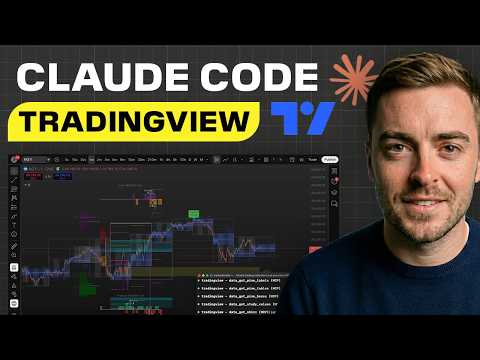
The screenshot-to-AI workflow has a structural flaw that no prompt engineering fixes: by the time your chart image reaches the model, the candle has moved. TradingView MCP eliminates that lag entirely by giving Claude direct access to the DOM — the live code layer underneath the chart — rather than a pixel rendering of it.
This is not an incremental improvement. It's a different category of tool.
The Architecture Shift Most Traders Are Missing
When you screenshot a chart and paste it into an AI, the model is doing image recognition — interpreting a grid of pixels and making probabilistic guesses about price levels, indicator values, and pattern shapes. Low-resolution screenshots, compressed images, or even just the aliasing on a wick can introduce ambiguity into what should be exact data.
TradingView MCP works through Chrome DevTools Protocol (CDP) — the same inspect-element layer developers use to read live page data. Claude isn't looking at a picture of your chart. It's reading the raw values: exact OHLC data per candle, indicator outputs, current price — all updating in real time, down to the one-second chart if that's what you're running.
Think of it this way: the difference between reading a photograph of a Bloomberg terminal and having direct API access to the feed. Same screen, completely different data fidelity.
What the Build Actually Looks Like
Setup runs through a one-shot prompt pasted into Claude Code — no manual JSON editing, no copy-pasting configuration files line by line. Claude handles the mcp.json creation itself, connects to TradingView Desktop via CDP, and confirms the connection with a health check command.
Once connected, the interaction is natural language to live chart:
- Chart navigation — "Show me the Bitcoin chart on the 1-week timeframe" executes directly. TradingView switches. No clicks.
- Indicator management — "Remove the volume indicator from the bottom" — gone in seconds.
- Strategy implementation — Claude researches publicly documented trading strategies (the video demonstrates pulling the Van De Pop Bitcoin swing setup combined with Tone Vays MACD methodology), writes the Pine Script, pushes it to the chart, and self-corrects compilation errors by reading the error output from the DOM in real time.
- Watch list scanning — Rather than cycling through assets one by one, a
morning_briefcommand triggers a sequential scan across a configured watch list (Bitcoin, Ethereum, Solana, XRP, Chainlink, Pepe in the demo), returning a consolidated signal report: current trend status, setup quality, and whether conditions meet entry criteria per the loaded strategy.
The morning brief output from the demo read: no long setups on Bitcoin (worst-looking chart of the majors), Ethereum closest to potential reversal, XRP neutral, others bearish. One command, six assets, no manual chart switching.
The Rules Layer
A rules.json file sits underneath the strategy layer — editable via conversation, not code. You define what constitutes a bullish setup, a bearish setup, entry conditions, exit conditions, risk parameters, and timeframes. Claude reads those rules, applies them to live chart data, and returns signals that reflect your logic, not a generic AI interpretation.
The practical extension: scrape transcripts from any public technical analyst, feed them to Claude, ask it to extract the strategy logic, encode it into rules.json, and generate a Pine Script. The morning brief then surfaces signals the way that analyst would read them — without the emotion, without the recency bias, without the need to watch every video.
What This Tool Is Not
This is not a trading signal service. The Pine Script strategy demonstrated in the video was assembled in real time from publicly documented methods — the presenter explicitly notes it wasn't a validated system. The architecture is sound; the strategy quality depends entirely on what you encode into the rules file.
The tool also doesn't execute trades. It reads, analyzes, and surfaces signals. Execution remains manual — which is the appropriate boundary for a system still being stress-tested by its early adopters.
The On-Chain Angle
For crypto traders specifically, the latency problem this solves is most acute in volatile conditions — exactly when on-chain signals matter most. When Bitcoin exchange inflows spike and price action starts moving fast, a screenshot-based workflow introduces a delay that can be measured in full candles. DOM-level access removes that delay. The signal and the data are the same moment.
The broader pattern here connects to something worth tracking: the tooling layer around crypto trading is converging with AI infrastructure faster than most retail participants have noticed. The traders building these integrations now — encoding their own strategy logic into automated systems — are compressing the analytical edge that used to require institutional infrastructure.
Acid Take: The architectural shift from image recognition to DOM-level data access is real and it matters. What the crypto trading community is building with TradingView MCP is essentially a lightweight quant workflow — strategy encoding, automated scanning, signal generation — that previously required a development team. The one-shot setup and natural language interface lower the barrier enough that retail traders can actually use it. Whether the strategies they load into it are any good is a separate question, and the more important one.
Bias Flag: The video is a tutorial from a creator with a paid subscription product (the "10X dashboard" referenced mid